Advanced Logic Patterns
Moving beyond simple connections, this chapter dives into the Runtime Architecture of the Flow System.
Understanding how the system executes Triggers versus Chains, and how Node configurations interact with Event configurations, is the key to mastering complex game logic.
⚙️ Core Mechanics: Trigger vs. Chain
In the Flow Graph, a connection isn't just a line; it's a Transfer of Control. The type of the Target Node determines how that control is handled.
| Feature | 🟠 Trigger Node | 🟢 Chain Node |
|---|---|---|
| Execution Mode | Parallel (Fan-Out) | Serial (Sequence) |
| Blocking? | ❌ Non-Blocking | ✅ Blocking |
| Technical Impl. | Fire-and-Forget | Coroutine Yield |
| Data Flow | Passes data to all children instantly. | Passes data to the next child only after finishing. |
1. The Trigger Mechanism (Parallel)
When the flow enters a Trigger Node:
- The system calculates the Priority of all connected Triggers.
- It executes them one by one in a loop.
- Crucially, it does not wait for a Trigger to finish its tasks before starting the next one.
- Result: To the player, all effects (Sound, UI, Particles) appear to happen simultaneously in the same frame.
2. The Chain Mechanism (Sequential)
The Chain Node has a complex lifecycle designed for pacing. It holds the flow using Two Layers of Delay:
- Pre-Execution: Waits for
Start Delay. - Execution: Raises the event.
- Post-Execution: Waits for
DurationORWait For Completion. - Signal: Only then does it fire the Next Node.
⏱️ The Timeline of Execution
It is vital to understand how Node Configuration (Graph) interacts with Event Configuration (Inspector).
The "Double Delay" Rule
If you configure a delay on the Node AND a delay on the Event, they are Additive.
Total Time to Action = Node Start Delay + Event Action Delay
Visual Timeline
Here is the millisecond-by-millisecond breakdown of a single Chain Node execution:
[Flow Enters Node]
      │
      ├── 1. Node Condition Check (Graph Layer)
      │      🛑 If False: STOP.
      │
      ├── 2. Node Start Delay (Graph Layer) ⏱️
      │      ⏳ Waiting...
      │
      ├── 3. Event Raised (Core Layer) 🚀
      │      │
      │      ├── a. Event Condition Check (Inspector Layer)
      │      │      🛑 If False: Skip Actions (But flow continues!)
      │      │
      │      ├── b. Event Action Delay (Inspector Layer) ⏱️
      │      │      ⏳ Waiting...
      │      │
      │      └── c. UnityActions Invoke (Game Logic) 🎬
      │             (e.g., Play Animation, Subtract Health)
      │
      ├── 4. Node Duration / Wait (Graph Layer) ⏳
      │      🛑 Flow is BLOCKED here.
      │      (Waits for Duration seconds OR Async Completion)
      │
      └── 5. Signal Next Node ⏭️
- Event Conditions only stop the local side effects (Action c). They DO NOT stop the Flow Graph from proceeding to step 4 and 5.
- To stop the Flow Graph logic, you must use Node Conditions (Step 1).
🛠️ Cookbook: Real-World Design Patterns
Here are the standard architectural patterns for solving common game development problems.
1. The "Cinematic" Pattern (Cutscene)
Goal: A strictly timed sequence of events. Scenario: Camera moves -> Door opens -> Character walks in -> Dialog starts.
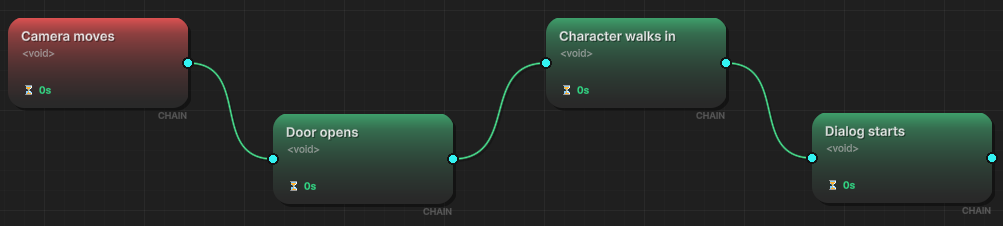
- Structure: Root ➔ Chain ➔ Chain ➔ Chain.
- Configuration:
- Use Chain Nodes (🟢) for every step.
- Use Node Duration (⏳) to pace the sequence.
- Example: If "Door Open Anim" takes 2.0s, set the Node Duration to 2.0 to ensure the character doesn't walk through a closed door.
2. The "Broadcaster" Pattern (Player Death)
Goal: One state change triggering multiple independent systems. Scenario: Player dies. You need to: Play Sound, Show Game Over UI, Spawn Ragdoll, Save Game.
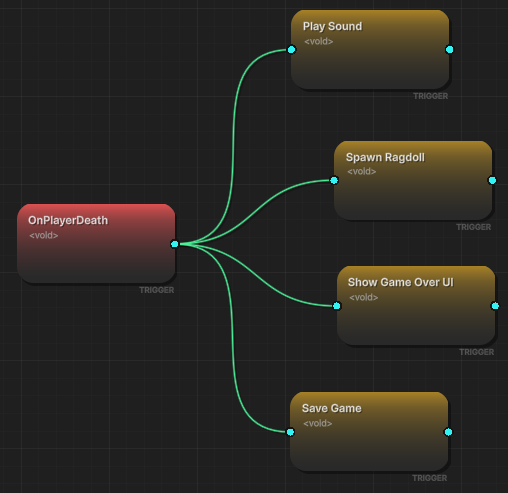
- Structure: Root ➔ Multiple Triggers.
- Configuration:
- Root: OnPlayerDeath.
- Children: 4 separate Trigger Nodes (🟠).
- Why: If the "Save Game" system hangs or errors out, you don't want it to block the "Game Over UI" from appearing. Parallel execution ensures safety.
3. The "Hybrid Boss" Pattern (Complex State)
Goal: Complex AI phase transition. Scenario: Boss enters Phase 2. He roars (animation), AND SIMULTANEOUSLY the music changes and the arena turns red. WHEN the roar finishes, he starts attacking.
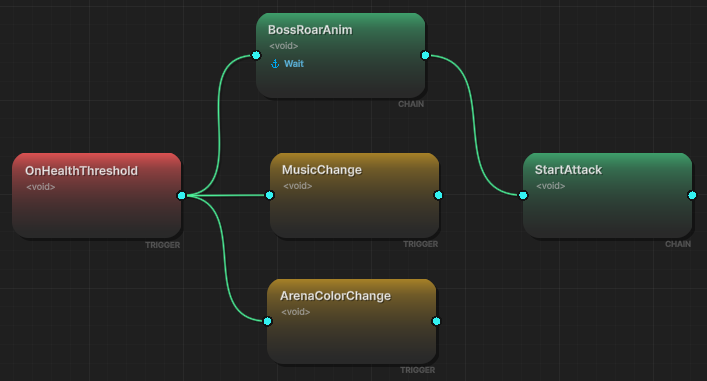
- Structure:
- Root (OnHealthThreshold).
- Chain Node (BossRoarAnim) with Wait For Completion checked (or Duration set to anim length).
- Trigger Node (MusicChange) attached to the Root (Parallel to Roar).
- Trigger Node (ArenaColorChange) attached to the Root (Parallel to Roar).
- Chain Node (StartAttack) attached to the BossRoarAnim node.
- Flow:
- Music and Color happen immediately alongside the Roar.
- The StartAttack waits until the Roar Chain Node is fully finished (Step 4 in Timeline).
🎯 Summary: When to use what?
| Requirement | Use Node Type | Why? |
|---|---|---|
| "Do X, then do Y" | Chain (🟢) | Guarantees order via blocking. |
| "Do X, Y, and Z all at once" | Trigger (🟠) | Fire-and-forget. Parallel execution. |
| "If HP < 0, do X" | Node Condition | Stops the flow logic entirely. |
| "Only play sound if not muted" | Event Condition | Stops the side effect, keeps flow logic running. |
| "Wait before doing X" | Node Start Delay | Delays the event raise. |
| "Wait after X before doing Y" | Node Duration | (Chain Only) Delays the next node signal. |