06 Conditional: The Logic Gate
📍 Demo Info
-
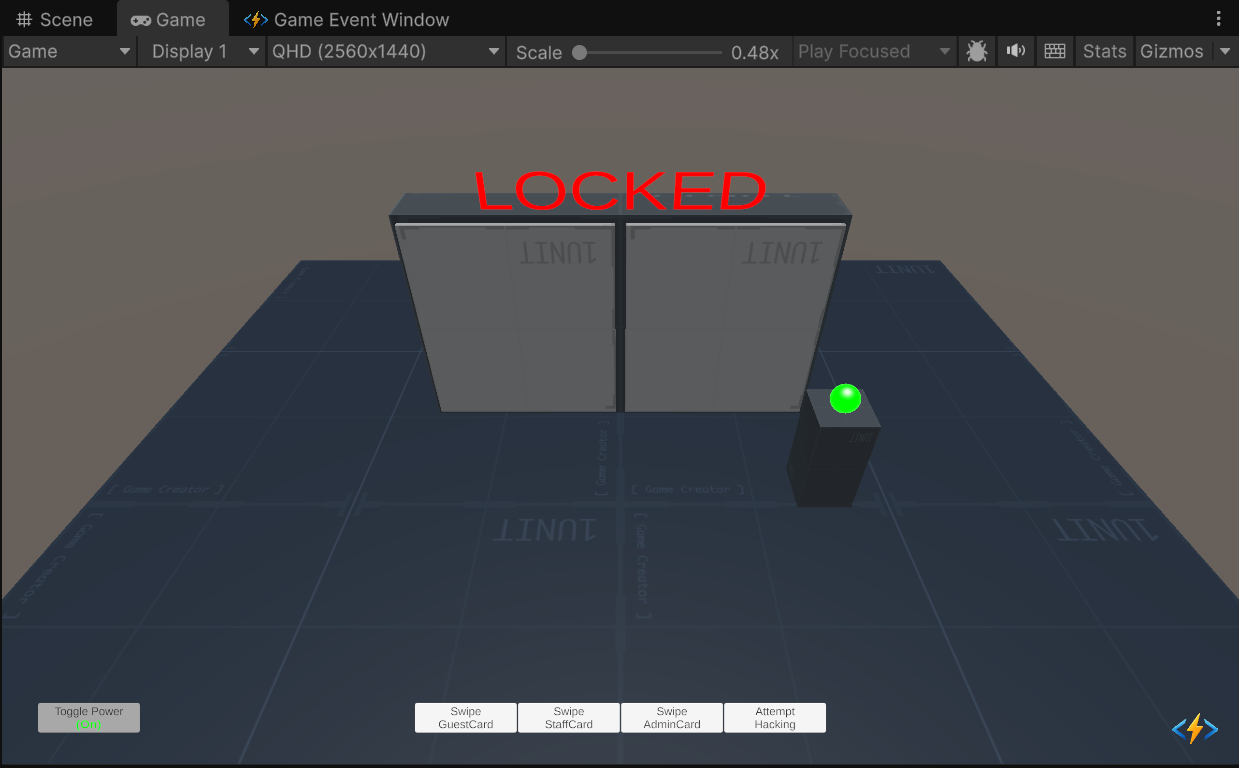
Scene Preview
-
Scene Path
Assets/TinyGiants/GameEventSystem/Demo/06_ConditionalEvent/06_ConditionalEvent.unityGoalTo demonstrate the Visual Logic Builder. You will learn how to create complex, nested validation rules (Conditions) directly in the Inspector, removing the need for
if/elsechecks in your scripts.
📝 Description
The "Zero-Code" Logic Challenge
Usually, checking if a door should open requires code like:
if (powerOn && (isAdmin || isLucky))
In this demo, the Receiver's OpenVault() method has NO logic. It simply plays the animation.
The Game Event System acts as the gatekeeper. It evaluates the entire condition tree before deciding whether to call the function.
The Logic Tree: The Vault opens ONLY if:
- Global Power is ON (Checked from Scene Object).
- AND one of the following is true:
- Security Level >= 4 (Admin).
- Department is in List: "Maintenance", "IT" (Staff).
- Random Chance > 90% (Hacker).
🛠️ Scene Setup
- The Vault: Massive double doors with a status text display.
- Security Grid: A scene object that holds the
IsPowerOnstate. - Power Button: Toggles the global power state (Visualized by screen vignette).
- Access Cards (Buttons):
- Guest: Low level, wrong department. (Relies on luck).
- Staff: Medium level, correct department. (Access Granted).
- Admin: High level. (Access Granted).
- Hacker: Invalid card. (Relies on pure luck).
🎮 How to Test
- Enter Play Mode.
- Toggle Power (Top Left): Ensure the screen border is Green (Power On).
- Click "Swipe Staff Card":
- Result: ACCESS GRANTED. Door opens.
- Reason: Although Level is 3 (<4), the Department "Management" is valid.
- Click "Swipe Guest Card":
- Result: LOCKED (Most likely).
- Reason: Fails level check, fails department check. Only a small random chance to open.
- Click "Toggle Power" (Turn Off):
- Result: Screen border turns Red.
- Action: Try swiping the Admin Card.
- Result: LOCKED. Even Admins cannot open the door without power.
🔑 Key Configuration
1. Event Definition (Editor)
We use a custom data class AccessCard to carry the user's credentials.

2. Receiver Action Binding (Behavior)
This is where the magic happens. The event is bound to OpenVault, but guarded by a Condition Tree.
The Visual Logic Tree:
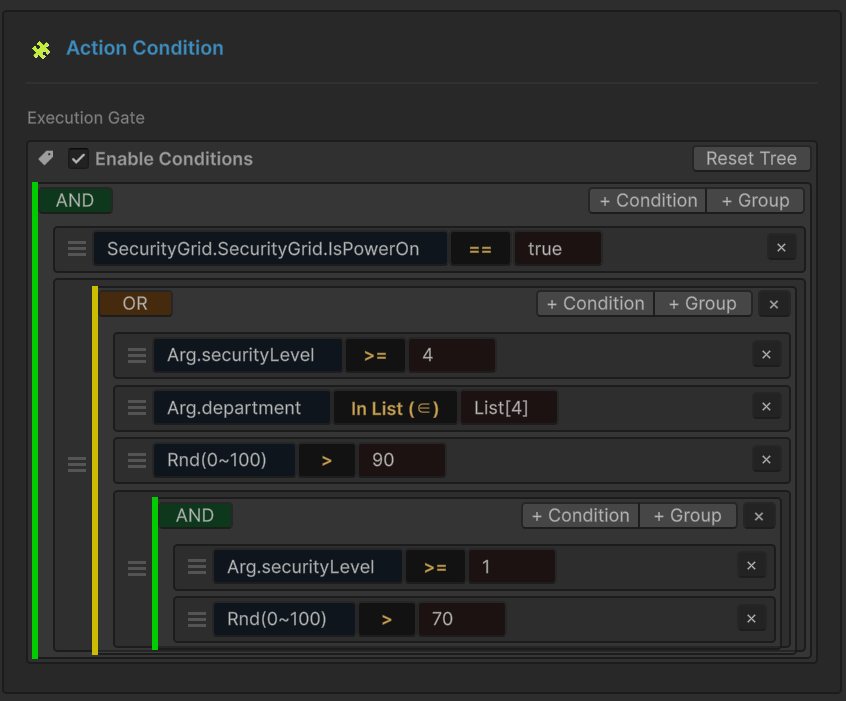
- Root (AND): Requires both branches to be true.
- Branch 1 (Scene Check): Reads
SecurityGrid.IsPowerOndirectly from the scene instance. - Branch 2 (OR Group): The "Credentials Check".
- Level Check:
Arg.securityLevel >= 4 - Dept Check:
Arg.departmentIn List["Maintenance", "IT"] - Luck Check:
Rnd(0~100) > 90
- Level Check:
3. Raiser Event Assignment (Inspector)
The Raiser script holds the reference to the OnAccessCard event.

💻 Code Walkthrough
1. The Sender (ConditionalEventRaiser.cs)
The sender constructs an AccessCard object with specific stats and raises the event.
public class ConditionalEventRaiser : MonoBehaviour
{
    [GameEventDropdown] public GameEvent<AccessCard> requestAccessEvent;

    public void SwipeStaffCard()
    {
        // Level 3, Dept "Management"
        // This fails the "Level >= 4" check, but might pass other checks in the tree.
        SendRequest("Staff_Alice", 3, "Management");
    }

    public void SwipeAdminCard()
    {
        // Level 5. Passes immediately.
        SendRequest("Admin_Root", 5, "Director");
    }

    private void SendRequest(string name, int level, string dept)
    {
        // Raises the event. The System will now evaluate the Condition Tree.
        // If the tree evaluates to FALSE, the Receiver is NEVER CALLED.
        requestAccessEvent.Raise(new AccessCard(name, level, dept));
    }
}
2. The Receiver (ConditionalEventReceiver.cs)
Notice how simple this script is. It contains ZERO validation logic. It assumes that if it was called, the check must have passed.
public class ConditionalEventReceiver : MonoBehaviour
{
    // NO IF STATEMENTS HERE!
    // The GameEventSystem acts as the gatekeeper.
    public void OpenVault(AccessCard card)
    {
        // If we reach here, Power is ON and Credentials are VALID.
        Debug.Log($"ACCESS GRANTED to {card.holderName}. Opening doors.");

        StartCoroutine(OpenSequenceRoutine(card.holderName));
    }
}
By moving logic into the Asset, you allow designers to change security rules (e.g., "Let's make Level 3 valid") without asking a programmer to recompile the script.