07 Delayed: The Time Bomb Scenario
📍 Demo Info
-
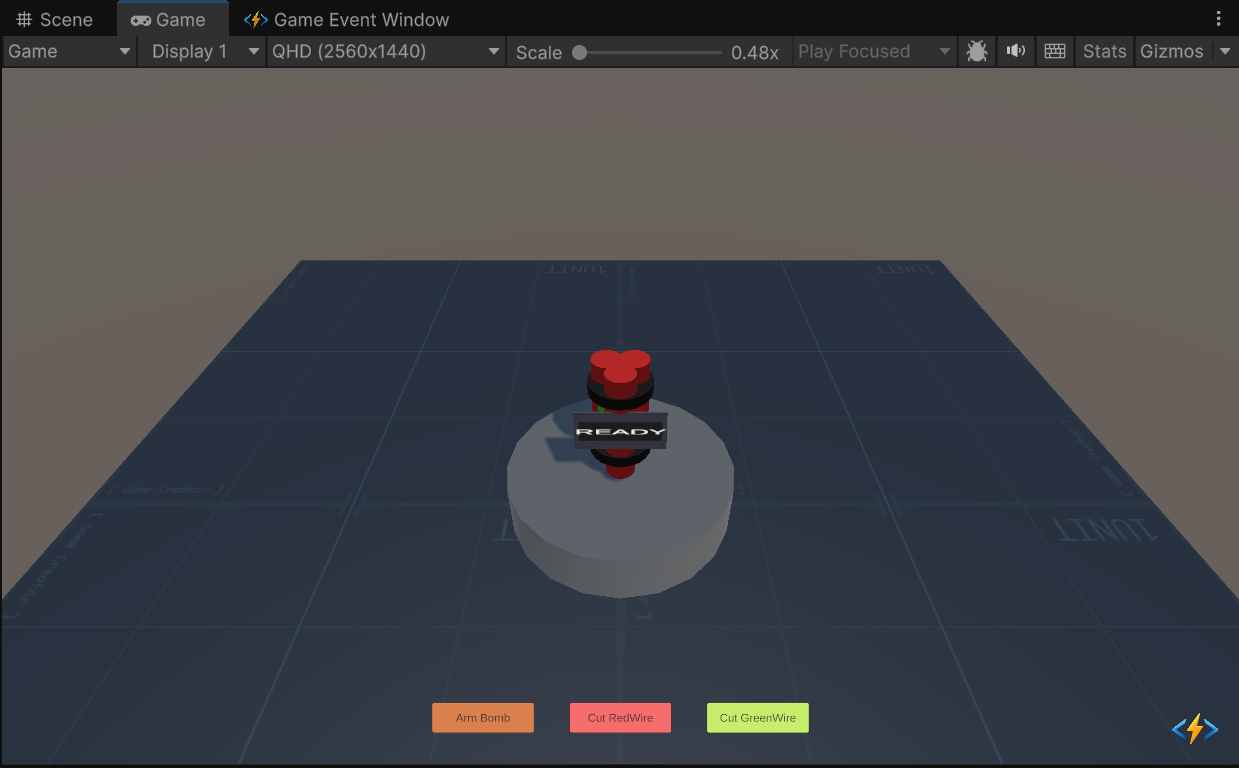
Scene Preview
-
Scene Path
Assets/TinyGiants/GameEventSystem/Demo/07_DelayedEvent/07_DelayedEvent.unityGoalTo demonstrate the Scheduling System. You will learn how to configure an event to fire after a delay, and critically, how to Cancel that pending event using code logic before it executes.
📝 Description
Adding the Dimension of Time
Standard events fire instantly (Raise() -> Execute()).
Delayed events introduce a gap: Raise() -> [Wait State] -> Execute().
The Scenario: Defuse or Boom This demo simulates a classic "Cut the Wire" mini-game.
- Arming Phase: Clicking "ARM BOMB" raises the
ExplodeEvent.- BUT, the event is configured with a 5.0s Action Delay.
- The signal is now "in flight" (Pending).
- Defusing Phase: You have 5 seconds to cut the correct wire.
- Safe Wire: Calls
event.Cancel(). The pending explosion is removed from the queue. - Trap Wire: Does nothing. The clock keeps ticking.
- Timeout: If time runs out, the pending event executes -> BOOM.
- Safe Wire: Calls
(Note: The Safe Wire is randomized every time you arm the bomb!)
🛠️ Scene Setup
The scene is constructed to visualize tension:
- The Bomb: A cylinder with a ticking timer text (
00.000). - Wires:
- 🟥 Red Wire Button: Triggers the "Cut Red" logic.
- 🟩 Green Wire Button: Triggers the "Cut Green" logic.
- Arm Button: Resets the state and starts the event.
- Feedback: Sparks particle system and tick/explosion audio.
🎮 How to Test
- Enter Play Mode.
- Click "ARM BOMB":
- Listen: The ticking sound starts.
- Watch: The timer counts down from 5.000.
- Console: Note the log
[Game Logic] Bomb Armed! The SAFE wire is: ...(You can cheat by reading this!).
- Experiment 1: Let it Explode:
- Do nothing. Wait for the timer to hit
0.000. - Result: The bomb explodes physically. The event
OnExplodeexecuted successfully.
- Do nothing. Wait for the timer to hit
- Experiment 2: Cut the Wrong Wire:
- Click "ARM BOMB" again.
- Click the wire that is NOT the safe one (e.g., if Log says Red is safe, cut Green).
- Result: Nothing happens. The timer continues. BOOM.
- Experiment 3: Defuse Successfully:
- Click "ARM BOMB" again.
- Click the SAFE wire.
- Result: Timer stops. Text says "DEFUSED". The explosion never happens.
🔑 Key Configuration
1. Event Definition (Editor)
We use a standard Void event onExplodeEvent.

2. Delay Configuration (Behavior)
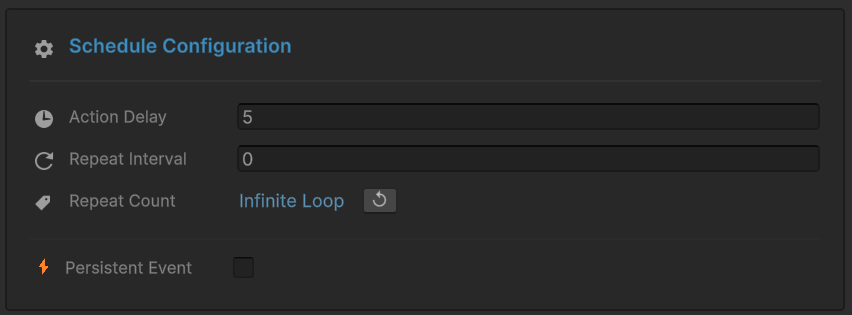
This is the critical step. Open the Behavior Window for onExplodeEvent.
Observe the Schedule Configuration section at the bottom:
- Action Delay: Set to
5(Seconds). - This tells the system: "When Raise() is called, wait 5 seconds before invoking the listeners."
3. Receiver Binding
The OnExplode method is bound normally. It contains the explosion logic.
- Note: The Receiver doesn't know about the delay. It just reacts when the event finally arrives.
4. Raiser Assignment (Inspector)
The Raiser script needs a reference to the event to both Raise() it and Cancel() it.

💻 Code Walkthrough
1. The Sender (DelayedEventRaiser.cs)
This script manages the game state and interacts with the event system's scheduler.
public class DelayedEventRaiser : MonoBehaviour
{
    [GameEventDropdown] public GameEvent explodeEvent;

    private string _safeWireColor; // Randomized at runtime

    public void ArmBomb()
    {
        // 1. Randomize the puzzle
        _safeWireColor = Random.value > 0.5f ? "Red" : "Green";

        // 2. Raise the Event
        // Because "Action Delay" is set to 5s in the Inspector,
        // this call puts the event into a "Pending" state.
        // It will NOT fire immediately.
        explodeEvent.Raise();

        // Start visual countdown (Cosmetic only - the real timer is inside the Event System)
        StartCoroutine(CountdownRoutine());
    }

    public void CutRedWire() => ProcessCut("Red");
    public void CutGreenWire() => ProcessCut("Green");

    private void ProcessCut(string color)
    {
        // Logic Check: Did we cut the right wire?
        if (color == _safeWireColor)
        {
            // 3. THE CRITICAL API CALL
            // .Cancel() stops the pending event execution.
            // The 5-second timer inside the Event Manager is destroyed.
            // The Receiver's OnExplode() will NEVER be called.
            explodeEvent.Cancel();

            DisarmSuccess();
        }
        else
        {
            Debug.LogWarning("Wrong wire! The clock is still ticking...");
        }
    }
}
2. The Receiver (DelayedEventReceiver.cs)
The receiver logic is purely reactive. It handles the physical aftermath.
public class DelayedEventReceiver : MonoBehaviour
{
    [SerializeField] private Rigidbody bombRigidbody;
    [SerializeField] private ParticleSystem explosionVFX;

    // This method is ONLY called if the timer reaches 0.
    // If Cancel() is called at 0.1s, this method never runs.
    public void OnExplode()
    {
        Debug.Log("BOOM! The event executed.");

        // Visuals
        if (explosionVFX) Instantiate(explosionVFX, ...);

        // Physics
        if (bombRigidbody)
        {
            bombRigidbody.isKinematic = false;
            bombRigidbody.AddExplosionForce(2000f, ...);
        }

        // Camera Shake
        StartCoroutine(ShakeCamera(0.5f, 0.8f));
    }
}
Notice how we separated the Visual Timer (in Raiser) from the Logic Timer (in GameEvent).
- The CountdownRoutine in the Raiser is purely for updating the UI text.
- The actual "Boom" logic is handled reliably by the Event System's internal scheduler. Even if the UI crashes, the bomb would still explode!