10 Trigger Graph: Parallel Event Dispatch
📍 Demo Info
-
Scene Preview
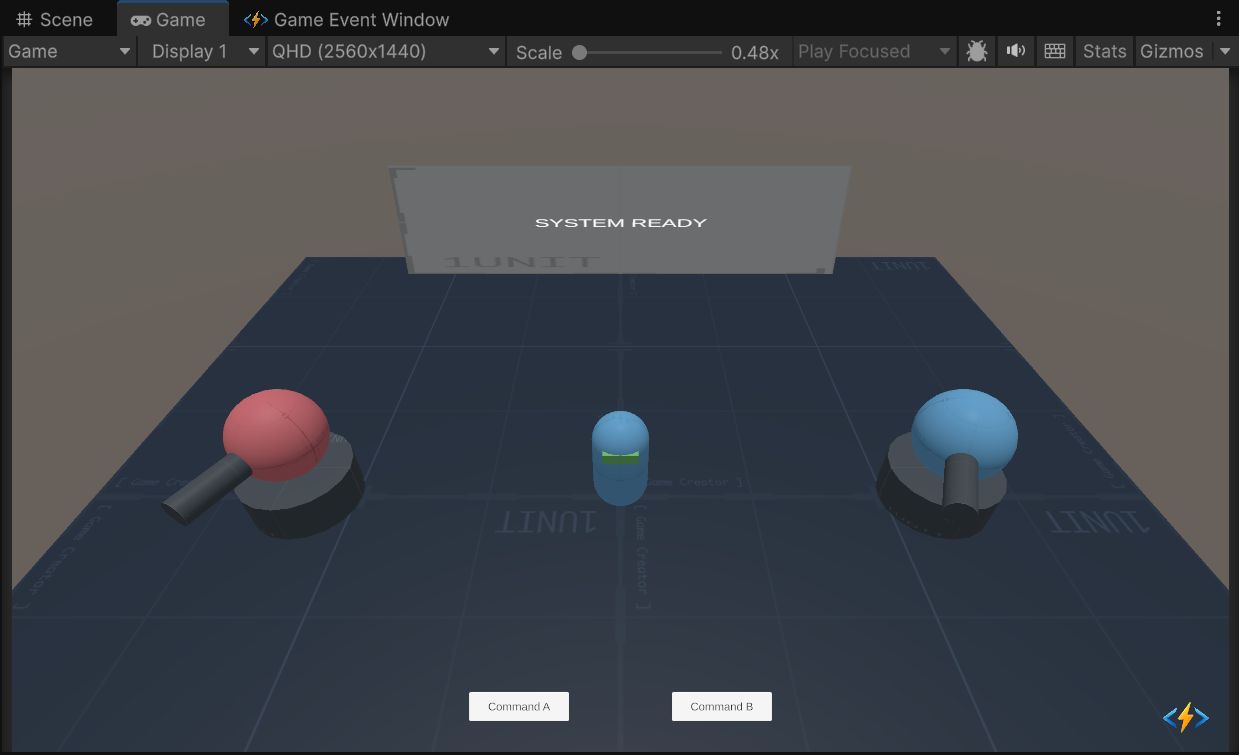
-
Scene Path
Assets/TinyGiants/GameEventSystem/Demo/10_TriggerEvent/10_TriggerEvent.unityGoalTo demonstrate the Trigger Node (Fan-Out) logic. You will see how a single event ("Command") can split into multiple parallel execution branches, filtered by conditions and prioritized for execution order.
📝 Description
The "Broadcast" Architecture In complex games, one action (e.g., "Attack Command") often needs to trigger many independent systems: Physics, Sound, UI, Achievements, etc.
Using code, this leads to bloated functions. Using the Flow Graph, we can visualize this as a Parallel Dispatch.
The Logic Mechanism:
We raise ONE root event (onCommand). The graph then evaluates 5 different downstream nodes simultaneously:
- Turret Specific Branches: Checks who sent the command.
- Global Alarm: Fires a screen flash effect.
- Data Logging: Logs damage stats to a
Holo UI. - Secure Log: Demonstrates blocking data transmission.
🛠️ Scene Setup
- Turret A (Left / Red): The "Smart" turret.
- Graph Logic: Activates Buff (Priority 100) -> Then Fires (Priority 50).
- Result: Critical Hit.
- Turret B (Right / Blue): The "Glitchy" turret.
- Graph Logic: Fires (Priority 100) -> Then Activates Buff (Priority 30).
- Result: Weak Hit (Buff arrives too late).
- UI Feedback:
- Holo Screen: Shows damage data.
- Screen Vignette: Flashes red for the Global Alarm.
🎮 How to Test
- Enter Play Mode.
- Click "Command A" (Left):
- Observation: Turret A turns Gold -> Fires -> CRITICAL HIT.
- Graph Logic: The "Buff" node executed before the "Fire" node due to higher priority.
- Global Effects: Screen flashes red (Alarm),
Holo textupdates.
- Click "Command B" (Right):
- Observation: Turret B fires -> Hits -> Turns Gold (Too late!).
- Graph Logic: The "Fire" node executed before the "Buff" node.
- Global Effects: Screen still flashes (Alarm is global).
🔑 Key Configuration
1. Event Definition (Editor)
Before building the graph, we created 6 distinct events in the Game Event Editor.
onCommand: The Root Event. This is the only event triggered by code.onActiveBuff,onTurretFire, etc.: The Leaf Events. These are triggered automatically by the Graph logic.

2. The Flow Graph (Visual Binding)
Instead of binding actions in the Inspector (Behavior Window), here we use the Flow Graph to wire everything together. This visualizes the Parallel Dispatch logic.

- Red Node: The Root (
onCommand). - Orange Nodes: The parallel triggers (
onActiveBuff,onTurretFire, etc.). - Execution Logic: When Red fires, all connected Orange nodes evaluate their conditions and priorities simultaneously.
3. Raiser Assignment (Inspector)
Select the TriggerEventRaiser object.
Notice that the script ONLY holds a reference to the Root Event (onCommand).
The script is completely unaware of the 5 other events downstream. This is the ultimate decoupling.

💻 Code Walkthrough
1. The Sender (TriggerEventRaiser.cs)
The sender is incredibly simple. It just raises ONE event. It has no idea that this event triggers 5 different things.
public class TriggerEventRaiser : MonoBehaviour
{
    // The Root Event that starts the graph
    [GameEventDropdown]
    public GameEvent<GameObject, DamageInfo> commandEvent;

    private void FireProjectile(GameObject sender, Transform muzzle)
    {
        // ... Projectile logic ...

        // RAISE THE ROOT EVENT
        // We just say "Command Issued". The Graph decides the rest.
        commandEvent.Raise(sender, info);
    }
}
2. The Receiver (TriggerEventReceiver.cs)
The receiver contains independent methods for each logical action. The Graph acts as the glue that calls them.
public class TriggerEventReceiver : MonoBehaviour
{
    // Action A: Buffs the turret
    public void ActivateBuff(GameObject sender, DamageInfo args) { ... }

    // Action B: Handles the shot impact
    public void TurretHit(GameObject sender, DamageInfo args) { ... }

    // Action C: Updates UI (Type Conversion handled by Graph compatibility)
    public void HoloDamageData(DamageInfo info) { ... }

    // Action D: Global Alarm (Void)
    public void GlobalAlarm() { ... }

    // Action E: Secret Log (Argument Blocked)
    public void LogSecretAccess(GameObject sender, DamageInfo data)
    {
        // Because "Pass Argument" is OFF in the graph node,
        // 'data' arrives as default/null here.
        if (data == null) Debug.Log("Secure Log: Data blocked.");
    }
}
Even though we call ActivateBuff and TurretHit in the same frame, the Graph Priority ensures ActivateBuff finishes its logic (setting _isBuffed = true) before TurretHit checks that boolean.