04 Custom Sender: Context-Aware Events
📍 Demo Info
-
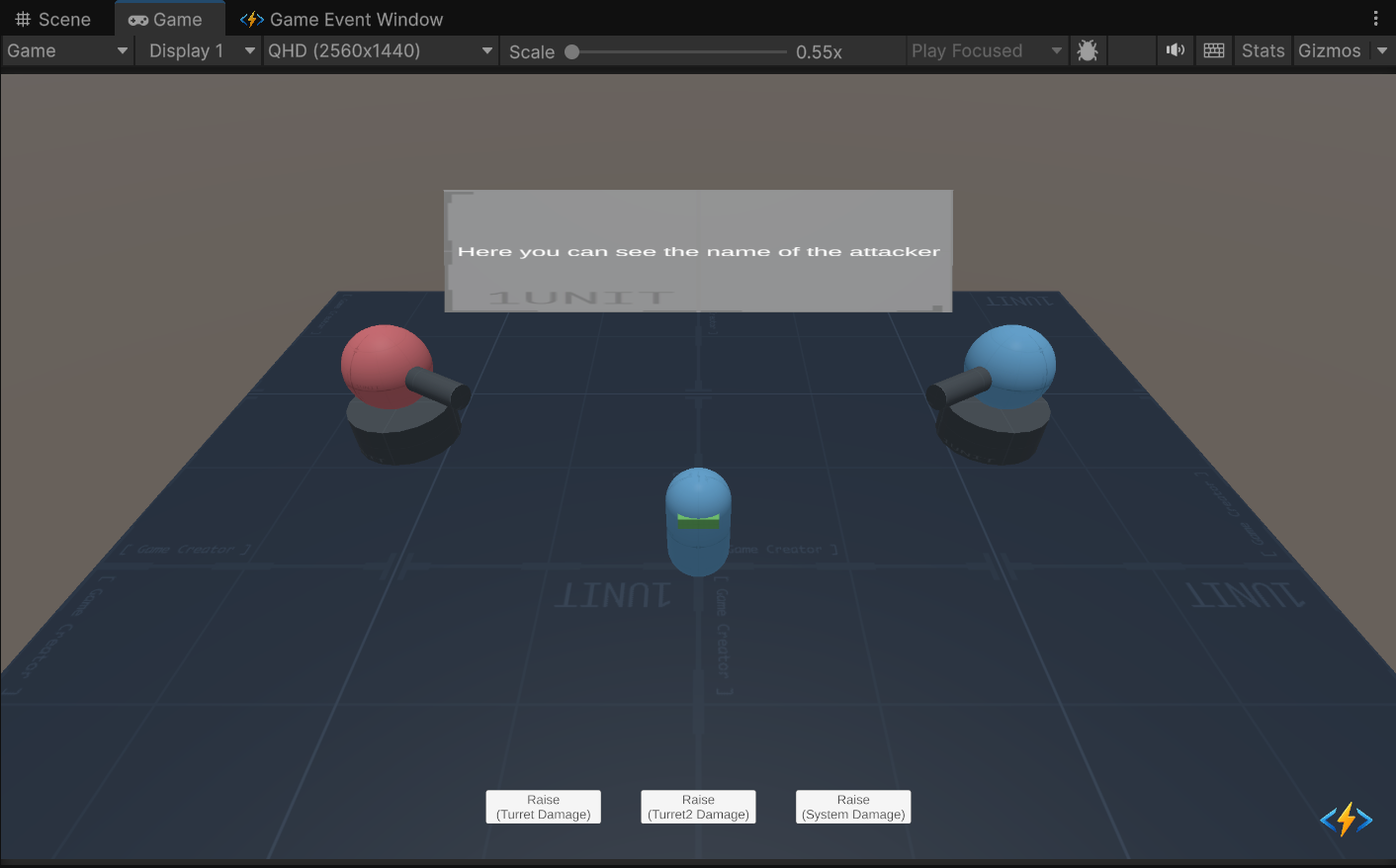
Scene Preview
-
Scene Path
Assets/TinyGiants/GameEventSystem/Demo/04_CustomSenderTypeEvent/04_CustomSenderTypeEvent.unityGoalTo demonstrate Sender-Aware Events (
GameEvent<TSender, TArgs>). This allows the receiver to know WHO triggered the event, enabling context-sensitive logic like "Face the Attacker" or "Display Attacker Name".
📝 Description
Why pass the Sender? In previous demos, the event carried data (Damage) but was anonymous. In complex games, context matters.
- If a Turret shoots me, I need to turn and face IT.
- If a System Message hurts me, I need to know the SOURCE class to display its log.
This demo introduces two types of Dual-Generic Events:
- Scenario A (Physical):
GameEvent<GameObject, DamageInfo>- Sender: A Unity
GameObject(The Turret). - Reaction: The victim physically rotates to look at the specific turret.
- Sender: A Unity
- Scenario B (Logical):
GameEvent<PlayerStats, DamageInfo>- Sender: A pure C# Class
PlayerStats(No Game Object). - Reaction: The victim displays the name/stats of the logical attacker from the data class.
- Sender: A pure C# Class
🛠️ Scene Setup
The scene simulates a testing ground with different types of threats:
- The Victim (Center): A capsule with a "face" (Green visor) to demonstrate rotation logic.
- Turret 1 (Red) & Turret 2 (Blue): Physical attackers in the scene.
- UI Buttons:
- Raise (Turret Damage): Fires event from Red Turret.
- Raise (Turret2 Damage): Fires event from Blue Turret.
- Raise (System Damage): Fires event from a virtual "GameMaster" using the
PlayerStatsclass.
🎮 How to Test
- Enter Play Mode.
- Click "Raise (Turret Damage)":
- Observation: The Victim rotates to face the Red Turret. Info Text shows "Sender1".
- Click "Raise (Turret2 Damage)":
- Observation: The Victim rotates to face the Blue Turret. Info Text shows "Sender2".
- Click "Raise (System Damage)":
- Observation: The Victim flashes red but does not rotate (because the sender is a script, not an object). Info Text shows "DragonSlayer_99" (Data from the
PlayerStatsclass).
- Observation: The Victim flashes red but does not rotate (because the sender is a script, not an object). Info Text shows "DragonSlayer_99" (Data from the
🔑 Key Configuration
1. Event Definition (Editor)
This demo uses Dual-Generic Events. In the Game Event Editor, you can see the complex signatures:
<GameObject, DamageInfo>: Used for physical turrets.<PlayerStats, DamageInfo>: Used for the logical system event.

2. Receiver Action Binding (Behavior)
The events are bound to methods that accept two parameters:
OnTurretAttackReceived(GameObject sender, DamageInfo args)- The system passes both the source object and the data packet to these functions execution.
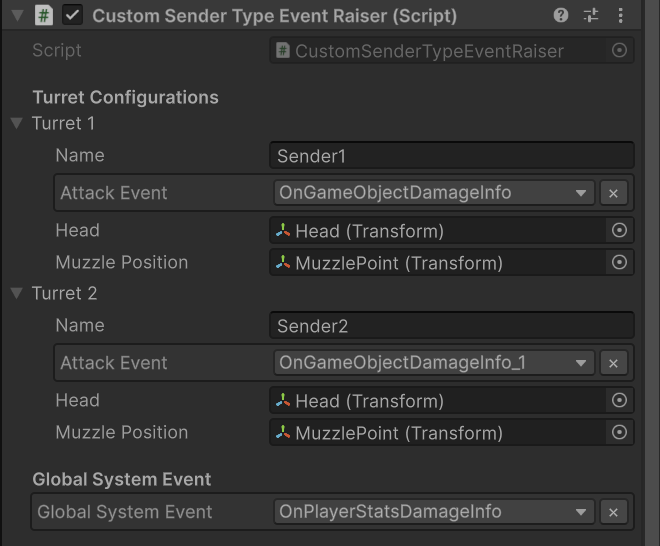
3. Raiser Event Assignment (Inspector)
Select the CustomSenderTypeEventRaiser object.
Look at the Turret Configurations. Each turret instance (Sender1, Sender2) is assigned a specific event asset. This allows the receiver to distinguish exactly which turret fired the shot.
💻 Code Walkthrough
1. The Pure Logic Class (PlayerStats.cs)
First, we define a pure C# class to act as a Sender. This proves you don't need a MonoBehaviour to send events.
[System.Serializable]
public class PlayerStats
{
    public string playerName;
    public int level;
    public int factionId;

    public PlayerStats(string name, int lvl, int faction)
    {
        playerName = name;
        level = lvl;
        factionId = faction;
    }
}
2. The Sender (CustomSenderTypeEventRaiser.cs)
When raising the event, we pass the Source (either GameObject or PlayerStats) and the Data.
public class CustomSenderTypeEventRaiser : MonoBehaviour
{
    // Scenario A: Physical Sender
    [GameEventDropdown]
    public GameEvent<GameObject, DamageInfo> turretEvent;

    // Scenario B: Logical Sender
    [GameEventDropdown]
    public GameEvent<PlayerStats, DamageInfo> systemEvent;

    public void RaiseTurretDamage()
    {
        // Pass 'this.gameObject' so the receiver knows who shot
        turretEvent.Raise(this.gameObject, new DamageInfo(15, ...));
    }

    public void RaiseSystemDamage()
    {
        // Create a virtual sender on the fly
        PlayerStats adminStats = new PlayerStats("DragonSlayer_99", 99);

        // Pass the C# object as the sender
        systemEvent.Raise(adminStats, new DamageInfo(50, ...));
    }
}
3. The Receiver (CustomSenderTypeEventReceiver.cs)
The listener method signature adapts to the specific Sender type.
public class CustomSenderTypeEventReceiver : MonoBehaviour
{
    [SerializeField] private TextMeshPro infoText;

    // Signature Match: void (GameObject, DamageInfo)
    public void OnTurretAttackReceived(GameObject sender, DamageInfo args)
    {
        // 1. Use the Sender for Physics Logic
        if (sender != null)
        {
            // Look at the specific turret that shot me
            StartCoroutine(SmoothLookAtRoutine(sender.transform.position));
        }
        infoText.text = $"Attacked by: {sender.name}";
    }

    // Signature Match: void (PlayerStats, DamageInfo)
    public void OnSystemAttackReceived(PlayerStats sender, DamageInfo args)
    {
        // 2. Use the Sender for Data Logic
        // We can access properties of the pure C# class
        infoText.text = $"Attacked by: {sender.playerName} (Lvl {sender.level})";
    }
}