03 Custom Type: Automated Code Generation
📍 Demo Info
-
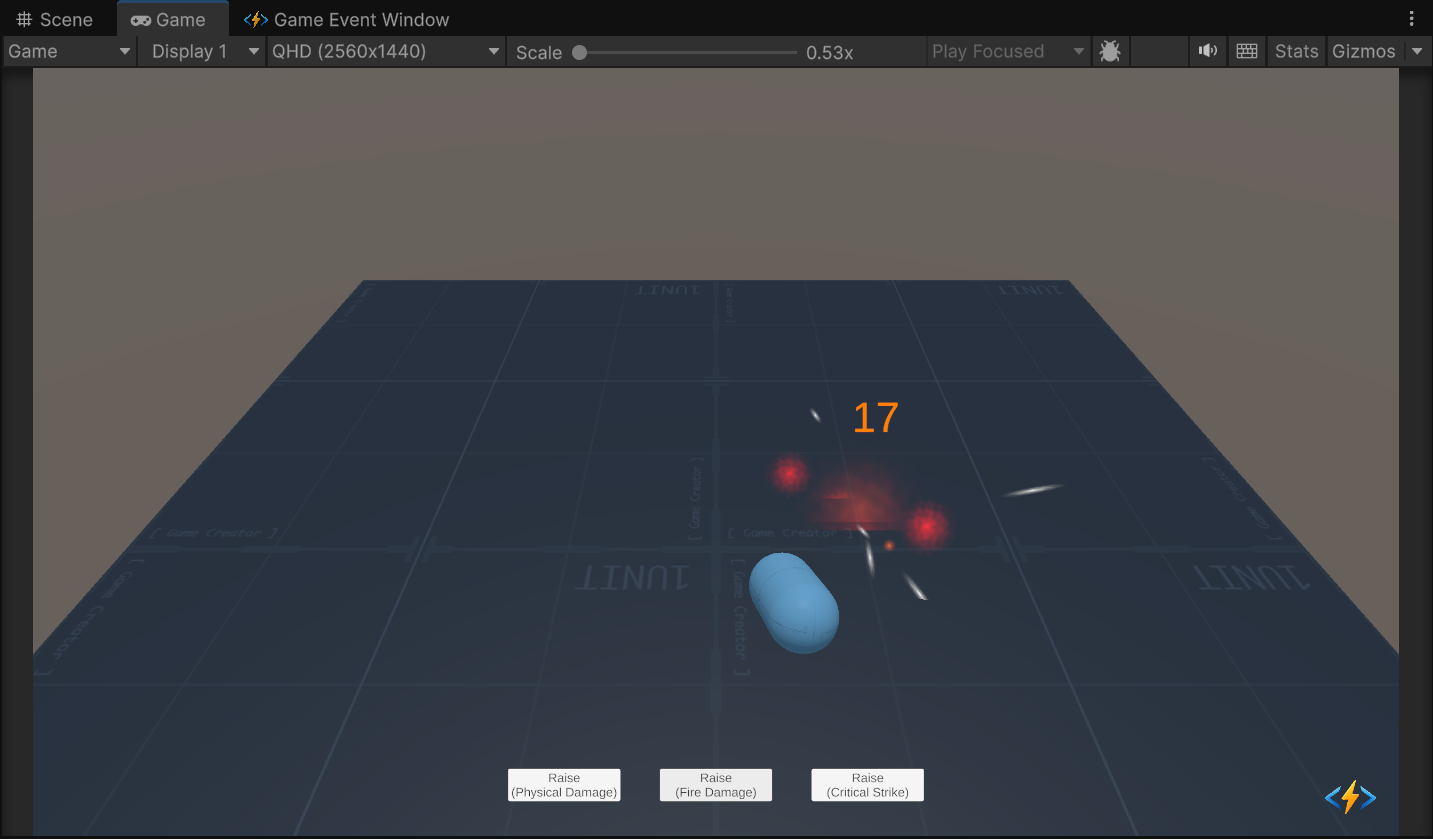
Scene Preview
-
Scene Path
Assets/TinyGiants/GameEventSystem/Demo/03_CustomTypeEvent/03_CustomTypeEvent.unityGoalTo demonstrate how to create events for Custom C# Classes (e.g.,
DamageInfo) and use the Automatic Code Generation system to ensure type safety.
📝 Description
Why Custom Types?
In real games, passing a single float (damage) is rarely enough. You often need to bundle data: Who attacked? Was it a crit? What is the damage type? Where did it hit?
This demo uses a custom data class named DamageInfo.
Instead of writing a custom DamageGameEvent.cs manually, we use the plugin's Wizard to generate it for us.
The Data Structure:
[Serializable]
public class DamageInfo
{
    public int amount;       // Damage value
    public bool isCritical;  // Critical hit flag
    public DamageType type;  // Physical, Fire, Void
    public Vector3 hitPoint; // Impact position
    public string attacker;  // Name of source
}
🛠️ Scene Setup
This combat simulation scene demonstrates how one event payload can drive multiple feedback systems simultaneously.
- The Dummy (Capsule): The victim. It has a Rigidbody and Renderer.
- Raiser Script: Simulates attacks from 3 different "Players" (Physical, Fire, Crit).
- Receiver Script: Parses the DamageInfo packet to play specific VFX.
Feedback Systems
- Physical: White flash + Small knockback.
- Fire: Orange flash + Fire particles at hit point.
- Critical: Purple flash + Screen Shake + Big knockback.
🎮 How to Test
- Enter Play Mode.
- Click "Raise (Physical Damage)":
- Observe the white flash and standard floating text.
- Click "Raise (Fire Damage)":
- Observe the fire particle effect spawning at the hit point.
- Click "Raise (Critical Strike)":
- Feel the impact! The camera shakes, the text is larger, and the dummy is knocked back harder.
🔑 Key Configuration
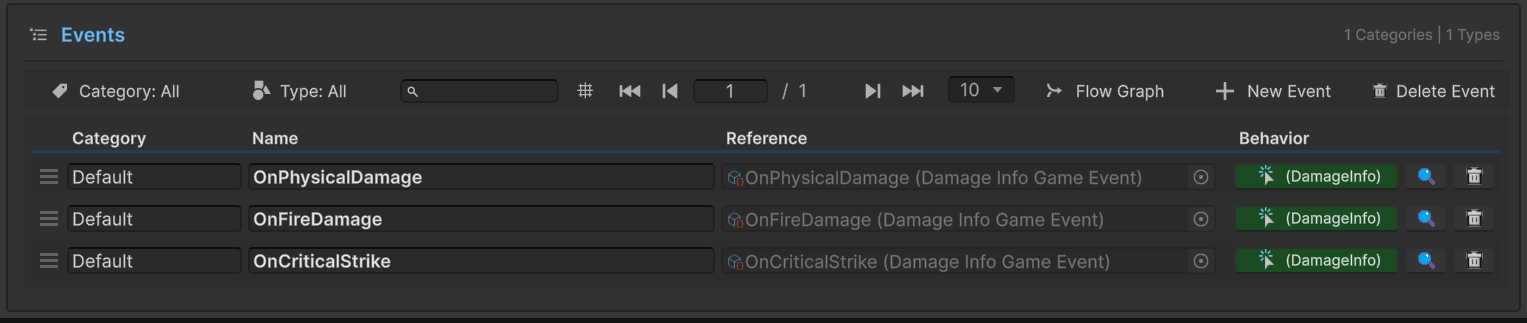
1. Event Definition (Editor)
The events in this demo use the custom class DamageInfo.
In the Game Event Editor, notice the type column displays <DamageInfo>, confirming these are strongly-typed events generated for your specific data structure.
2. Receiver Action Binding (Behavior)
The events (OnPhysicalDamage, OnFireDamage, etc.) are all bound to the same receiver method: CustomTypeEventReceiver.OnDamageReceived.
The receiver will dynamically parse the DamageInfo payload to decide whether to show fire particles or screen shake.
3. Raiser Event Assignment (Inspector)
Select the CustomTypeEventRaiser object.
The script holds references to the specific event assets. When you click "Deal Fire Damage", the script simply calls .Raise(info) on the assigned Fire Damage Event.

If you try to bind a method that takes float or int, the Inspector will not show it. This prevents runtime crashes caused by invalid data casting.
💻 Code Walkthrough
1. The Sender (CustomEventRaiser.cs)
Notice we construct the complex object locally and pass it as a single argument.
public class CustomEventRaiser : MonoBehaviour
{
    // The generic class 'GameEvent<DamageInfo>' was auto-generated!
    [GameEventDropdown] public GameEvent<DamageInfo> fireDamageEvent;

    public void DealFireDamage()
    {
        // 1. Construct the data packet
        DamageInfo info = new DamageInfo(
            amount: Random.Range(15, 25),
            isCrit: false,
            type: DamageType.Fire,
            hitPoint: CalculateHitPoint(),
            attacker: "Player02"
        );

        // 2. Raise with the packet
        // The system handles the serialization (if needed) and passing.
        fireDamageEvent.Raise(info);
    }
}
2. The Receiver (CustomTypeEventReceiver.cs)
The receiver unpacks the object and routes logic based on its properties.
public class CustomTypeEventReceiver : MonoBehaviour
{
    public void OnDamageReceived(DamageInfo info)
    {
        // 1. Visuals based on DamageType
        Color color = GetColorByType(info.type);
        ShowFloatingText(info.amount, color);

        // 2. Physics based on HitPoint
        if (targetRigidbody != null)
        {
            Vector3 forceDir = (info.hitPoint - transform.position).normalized * -1f;
            targetRigidbody.AddForce(forceDir * 5f, ForceMode.Impulse);
        }

        // 3. Special feedback for Crits
        if (info.isCritical)
        {
            StartCoroutine(ShakeCamera(0.4f));
        }

        // 4. Specific logic for Fire
        if (info.type == DamageType.Fire)
        {
            SpawnFireParticles(info.hitPoint);
        }
    }
}